



NEW MINING POOL: BitcoinKnots (BTCB2)
Help & Info
Documentation, FAQ & Terms of Service
Live since 2014
Built by miners,
Mining-Dutch is a cryptocurrency mining pool from the Netherlands. The pool has been live since 2014 and is run by Mining-Dutch B.V., a registered Dutch company since 2017, Chamber of Commerce number 71103236. Mining-Dutch mines more than 128 proof-of-work coins natively, including Bitcoin. What you mine is what you get paid: mine Bitcoin and you are paid in Bitcoin, mine Litecoin and you are paid in Litecoin. Currency Conversion is optional. Stratum servers are in Amsterdam, Paris, Canada, Singapore and Australia.
Built by miners,
for miners.
We noticed there was no place for skilled, well-schooled miners on the web. Most pools are Yiimp-based or PPS with lots of hidden behaviour. So we built our own, at first only for solo mining with our own equipment.
It worked so well we opened it to the public, and we've been refining it ever since. Today, we're a pool that has it all.

All reward modes
Pick any payout model. SOLO, PROP, PPLNS and PPS. Paired with auto-switching multiports you can tune yourself.
Full miner control
Run every rig from one dashboard. Swap coins, switch modes, retarget difficulty. Applied live, no terminal access, no restarts, no downtime.
Transparent by default
Audit every share, every block, every payout. No black box, no hidden fees, no trust required.
Global servers
Amsterdam, Paris, Canada, Singapore and Australia. Directly connected to US, Europe, Russia, Asia and Oceania.
Custom auto-exchange
Mine any coin, get paid in any other. Our in-house exchange sells the moment coins confirm. No manual swaps, no third-party accounts, no missed price windows.
Party mining
Learn more
Mine together. Share the block.
Team up with friends or your own rigs under a shared party password. Found blocks are split between everyone in the party based on contributed shares. Like solo, but stronger together.
Quick-start guide
Step-by-step setup to get your miner connected and earning.
Navigation















Miner Optimisation
Password arguments
Supported password arguments:
d=Static share difficultyn=Set a worker nameStatic Difficulty
Only set static difficulty when your miner isn't submitting any shares, or when using proxied hashrate. In any other scenario the pool software retargets your diff periodically in a soft way which is considered best practice.
You can set a static share difficulty for your miner using the d= flag. Example: d=16382 sets a static share difficulty of 16382.
- Values lower than the default port difficulty are applied immediately on connect.
- Values higher than the port difficulty are applied after a few minutes of mining.
- For Nicehash / MiningRigRentals, flag the mining-server for custom settings with
d=nicehashord=mrr. - If no value is provided, the pool will automatically manage your difficulty so the miner submits a share every ~5 seconds.
Worker names
Worker names can be assigned in two ways:
- Preferred. Append the worker name to your username separated by a dot:
--user username.superworker - Password argument using
n=:
--user username --pass "n=superworker"
Configure Payouts
Tell us where your earnings go. By default each coin is paid out to its own wallet address. Auto-conversion is optional if you'd rather receive payouts in a different currency.
- Unlock your wallets. Press the UnLock button below your wallet list, then enter the OTP code we email you to confirm. Your wallets are now editable.
- Set a payout address per coin. Paste your private wallet address next to each currency you want to receive.
- Set the AP Threshold. The minimum balance before we send a payout.
Optional
Auto-conversion
If you'd rather receive payouts in a different currency than the coin you're mining, set up auto-conversion. Two approaches to pick between.
Source coins get converted, not paid out. Don't try to forge a BTC address into a LTC wallet. It won't work. The wallet field for an auto-converted coin is ignored.
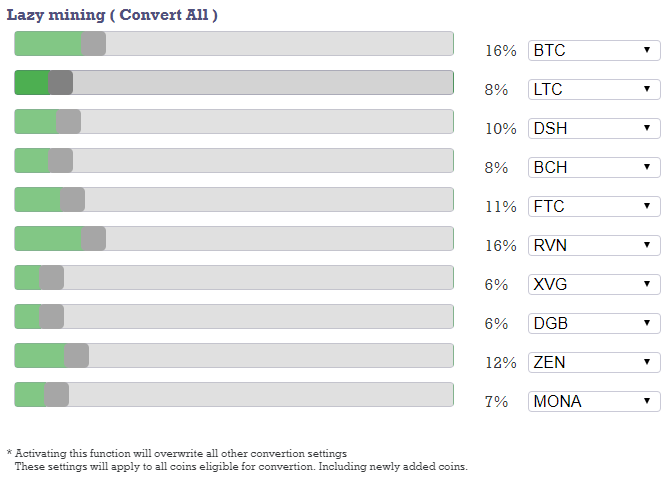
Lazy
Choose up to 10 target coins. All earnings convert into them proportionally, automatically.
Manual
Per-coin drop-down, or use set all above your wallets. No address needed on source coins, they're converted not paid.
Multiport and Pool overview
The difficulty and net hashrate shown on the Pool Overview won't match what most other pools or multiports report. That's intentional.
Most multiports read difficulty straight from the wallet or blockchain, which is the difficulty of the last block that was found. That's not what you want while you're mining. You want the difficulty of the block you're working on right now.
We calculate that current difficulty directly and derive net hashrate from it. The multiport switches coins based on those live numbers, so it moves the moment a coin becomes profitable, not after the next block confirms.
- Switches in real time. The moment a coin becomes more profitable, the multiport moves.
- No confirmation lag. Profit-switching is immediate, not reactive.
- Daily curation. Underperforming coins are removed from the rotation.
Payout and Fee
Every pool supports every reward mode. Payouts run every 15 minutes after a transaction confirms.
Pool fee per mode
Default fees are flat and depend on the mode you're using. Per-coin exceptions are listed in the pool-fee table further down. Click any mode to jump to its explainer.
D-PPS1.50%
Dynamic Pay‑Per‑Share
PROP1.00%
Proportional
A-PROP1.00%
Aggregated Proportional
PPLNS1.00%
Pay‑Per‑Last‑N‑Shares
SOLO0.50%
Solo mining
PARTY1.00%
Party mining
Pool fee exceptions · per coin
Currency
Algorithm
D-PPS
PROP
PPLNS
SOLO
PARTY
 BCH
BCHSha256
2.00 %
·
·
·
·
 BCH2
BCH2Sha256
2.00 %
·
·
·
·
 BTC
BTCSha256
2.00 %
1.50 %
1.50 %
1.00 %
1.50 %
 LC2
LC2Scrypt
1.90 %
·
·
·
·
 QUAI
QUAISha256
·
2.50 %
·
·
2.50 %
 QUAI_SCRYPT
Scrypt
·
2.50 %
·
·
2.50 %
 SPACE
SPACESha256
2.00 %
·
·
·
·
All other
1.50 %
1.00 %
1.00 %
0.50 %
1.00 %
On withdrawal · network cost passed on
Currency
Algorithm
Transaction cost
 ARRR
ARRREquihash
0.00100000 ARRR
BCHSha256
0.00000300 BCH
 BSV
BSVSha256
0.00000300 BSV
BTCSha256
0.00005000 BTC
 DASH
DASHX11
0.00001000 DASH
 LTC
LTCScrypt
0.00001000 LTC
QUAISha256
0.10000000 QUAI
QUAI_SCRYPTScrypt
0.10000000 QUAI_SCRYPT
 XMR
XMRRandomx
0.00004500 XMR
 XVG
XVGScrypt
0.10000000 XVG
 ZCL
ZCLEquihash_gpu
0.00010000 ZCL
 ZEC
ZECEquihash
0.00100000 ZEC
 ZER
ZEREquihash_gpu
0.00010000 ZER
all others
Gratis
Merged mining (free coins)
Merged mining runs automatically alongside the coin you're already mining, on compatible algorithms. It costs nothing extra and can't be turned off (there's no reason to).
Merged blocks always pay using the finder's mining mode:
- SOLO finders keep the entire merged block.
- PROP and A-PROP finders split the merged block by the proportional scheme.
- PPLNS finders split the merged block over the PPLNS share window.
- PARTY finders split the merged block among the party members.
- D-PPS miners are paid for merged coins through the D-PPS share rate. There's no separate reward for finding the block itself.
D-PPS D-PPS Dynamic Pay Per Share explained.
Pay-Per-Share (PPS) gives you an instant, flat payout for every accepted share, regardless of whether the pool actually finds a block in that round.
Think of it as the lottery. You buy a ticket and the pool guarantees your statistical share of the prize. Submit 1 share out of 10? You're paid as if you won 10% of the block. Every time, win or lose.
The pool absorbs all the variance. Long-term you average out to the statistical mean; short-term you skip the streaks of bad luck. The trade-off is that the pool takes on the risk, which is why PPS pools usually charge a higher fee than PROP pools.
Dynamic PPS is our improvement on standard PPS. Vanilla PPS values each share at the difficulty at payout time (or a rolling average). Our D-PPS values each share at the exact difficulty and coinbase reward it was submitted on.
- Every share is paid at its true value. You always mine on 100% luck.
- Profit-switching while on PPS. Most pools force you onto PROP for multiport. D-PPS is the only flat-payout mode that supports real-time switching.
- Merged coins included. Every share you submit gets credit, whether it was also valid on a merged chain or not.
SOLO SOLO mining explained.
Solo mining means you mine for yourself, not for the pool. Find the block, keep the entire reward. Don't find it, earn nothing for that round.
Same lottery analogy as PPS, but flipped. You buy a single ticket. If it wins, the whole jackpot is yours. If it doesn't, you walk away with nothing.
- If your round doesn't produce a block, no payout.
- Merged coins follow the same rule. A SOLO finder keeps the entire merged block.
PROP PROP Proportional payout explained.
Proportional (PROP) pays only when the pool finds a block. No block, no payout. Your share of the block matches your share of the work for that round.
Worked example:
- A block is found after 100,000 shares.
- You submitted 1,000 of them, so 1% of the round's hashrate.
- The block pays 200 FTC. You get 1% = 2 FTC.
The math holds regardless of round length. Lucky round (50,000 shares, you submitted 500)? Still 1%, still 2 FTC. Unlucky round (200,000 shares, you submitted 2,000)? Same again, 1%, 2 FTC. Your payout always tracks your % contribution to the round.
Variance lands on the miners, not the pool. Over time it averages out, but individual rounds swing both ways.
Merged coins follow the same scheme. A PROP finder splits the merged block proportionally.
A-PROP A-PROP Aggregated Proportional payout explained.
Aggregated Proportional (A-PROP) is a variant of PROP. Instead of paying out the moment each block is found, A-PROP collects shares across several blocks and pays the combined total on a rolling cycle.
Payouts run roughly every 15 minutes, give or take depending on pool luck. The benefit: variance gets smoothed out across rounds, so individual unlucky blocks don't sting as hard as they would on plain PROP.
Merged coins follow the same aggregation. A-PROP finders split merged blocks across the same window.
PPLNS PPLNS Pay Per Last N Shares payout explained.
Pay Per Last N Shares (PPLNS) pays only when the pool finds a block, similar to PROP. The difference is the share window: PPLNS averages over the last 10 blocks instead of paying purely on the current round.
The pool calculates what an average round should have been and pays based on that window:
- Fast block (50% effort). The pool pulls in older shares from previous rounds to fill the window up to the 100% average. You get paid for older shares you might otherwise have lost.
- Slow block (200% effort). Only your most recent ~50% of submitted shares are paid (matching the 100% average window). Older shares in the current round are ignored.
PPLNS rewards miners who stick around and discourages hopping. Variance still lands on the miners. Bad pool luck means lower payouts, good luck means higher.
Don't combine PPLNS with profit-switching (multiport). Hopping coins forfeits the share window you've built up. Use D-PPS or PROP if you want auto-switching.
Merged coins follow the same window. PPLNS finders split merged blocks across the same N-share range.
PARTY PARTY mining explained.
Party mining lets you and a group of trusted miners pool your hashrate together while staying outside the main pool. Everyone using the same party password (the "party ID") is in your party.
When anyone in the party finds a block, the reward is split among party members proportionally to the shares each one contributed during that round. It's solo-like in spirit (your party against the rest of the pool) but stronger together. A single party member doesn't have to find a block alone to earn.
Party blocks pay out as PROP among members sharing the same ID. Merged coins follow the same rule.
- Party mining is at your own risk. We can't guarantee that all party members will act honestly.
- Only invite miners you trust.
- Like SOLO, no block found means no earnings for that round.
⇆ Currency Conversion
Currency Conversion lets you mine any coin and receive payouts in a different currency. Enable it from your Wallets page.
How it works
- You mine as usual. Coins are credited to your account on the source coin.
- Once those coins reach confirmed status, conversion kicks in.
- The pool sells the confirmed credits on the exchange. The price they sell at is the value used for your conversion.
- Your transactions change from Credit to Converted, and the combined value is credited back as a single Converted Credit.
- Converted credits pay out the same as any other coin once your AP threshold is met.
You can review every credit and conversion on the Transactions page.
An extra fee of 1.5% is charged when currency conversion is enabled. This sits on top of standard pool fees.
FAQ
- Will coins I mined before enabling conversion also get converted?
A: Yes. Once enabled, all confirmed coins (including older balances) are converted.
- My coins are confirmed but they're not being converted. Why?
A: The pool has to sell coins on the exchange before it can convert them. Most exchanges enforce a minimum transaction size, so we need to accumulate enough balance first. Conversion happens once that threshold is reached.
- What does "Conversion disabled by pool" mean?
A: Sometimes exchanges put a wallet offline or into maintenance while keeping the market open. If we can't deposit your coins, we can't sell them, and we can't convert them. Conversion resumes automatically once the wallet is back online.
- When do I get my converted coins paid out?
A: Same as any other coin. As soon as your balance exceeds the AP threshold set in your wallet, payout happens on the next cycle.
Pool overview
Legend
Currency conversion available
Conversion temporarily disabled
Multiport mining enabled
Columns
- Workers
- The number of workers currently digging on the pool.
- Pool Speed
- The total pool hashrate currently digging on the pool.
- Calc. Netspeed
-
The amount of hashrate needed to find blocks on time, given the expected block time and current difficulty.
Not the actual network hashrate. It's calculated to show your chances of finding a block.
- Difficulty
-
The current difficulty of the next block. May differ from the pool dashboard or a block explorer.
Wait until a block is found and you'll see it match this number. We use this difficulty for multiport and profitability calculations.
- BTC / (Mhs · Ghs · Ths)
- Your expected profit, calculated from current difficulty, network speed, block reward and coin price.
- Progress
- Shares processed for the current block at the current difficulty. 100% is the expected amount of shares needed to solve the block.
- Status
-
Status of the pool and its stratums.
- Online: pool is active and mining is open.
- Maintenance: stratum is closed, but withdrawals might still be possible.
- Offline: pool is fully closed. No mining or withdrawals.
Workers overview
Worker columns
- Coin / Set
- The configured coin or coin-set for this worker on this algorithm.
- Mining
- The coin and mode the worker is currently mining on.
- Algorithm
- The algorithm the worker is mining on.
- Hashrate
- Average hashrate over the past 12.5 minutes.
- Shares p/s
-
Share submission rate (shares per second) over the past 12.5 minutes.
Optimal range is 0.08 to 0.30 S/s. A higher share rate does not mean better earnings.
- diff.
-
Average share difficulty over the past 12.5 minutes.
- Increase difficulty: fewer shares per second.
- Decrease difficulty: more shares per second.
- Profitability
- Current BTC earned per Mhs / Ghs / Ths per day.
- LS
- Seconds since the last share was received by the pool.
Set miner settings
- Miner / Group
- Select a miner or miner-group to change settings for.
- Coin / Set
- Select a coin or coin-set to switch your miner(s) to.
- Mode
-
- Pooled: standard pooled mining. Your miner contributes to the pool's collective hashrate and earns its share of every block any pooled miner finds.
- Solo: blocks your miner finds pay 100% to you. Blocks from other miners give you nothing.
- Party: same as solo, but share earnings with friends or other rigs using your party password.
Solo and Party are at your own risk. If you're not sure what you're doing, stick with Pooled.
- Party Pass
- Your unique password to share with friends or rigs. Anyone mining with this password joins your party.
- Schema
-
- Profitability: auto-switch between coins in your coin-set, always picking the most profitable one.
- Rotation: cycle through your coin-set alphabetically (A, B, C, ..., Z).
- Margin
-
- Profitability schema: only switch when another coin becomes this percentage more profitable than the current one.
- Rotation schema: move from one coin to the next after this many minutes.
Coin sets and miner groups
- Coin-Set
- Create your own set of coins to use in miner settings.
- Miner-Group
- Group multiple miners together so you can control them with a single settings change. Useful for large fleets.
Frequently Asked Questions
- Is Mining-Dutch a European mining pool?
A: Yes. Mining-Dutch is a Dutch company, registered in the Netherlands, with stratum servers in Amsterdam and Paris for European miners.
- Does Mining-Dutch mine Bitcoin directly?
A: Yes. Mining-Dutch runs its own Bitcoin pool and finds real Bitcoin blocks. Every block carries the tag /Mining-Dutch/ and our blocks are listed on mempool.space under Mining-Dutch.
- Do I get paid in the coin I mine?
A: Yes. Every coin is mined natively and paid out in that same coin. Converting to another coin is only done if you turn on Currency Conversion yourself.
- Do I need to change my miner settings to switch coins or reward modes?
A: No. Every port supports every reward mode and every coin with the same algorithm. You choose the coin and the mode in the Mining-Dutch dashboard, and the change is applied live without restarting your miner.
- How transparent is Mining-Dutch?
A: Fully. Every share, every block, every payout and every conversion is shown on the website, and each one can be checked against the blockchain. Every block we find carries our /Mining-Dutch/ tag, so anyone can verify it on a block explorer. There are no hidden fees and no black box.
- Can I mine Bitcoin solo on Mining-Dutch?
A: Yes. Solo miners keep the full block reward minus the solo pool fee. All reward modes are available for Bitcoin.
- What are the Bitcoin pool fees?
A: Fees depend on the reward mode you choose. The current fee per mode, and any per-coin exceptions, are listed in the Payout and Fee section.
- When will I get paid?
A: Payouts run every 15 minutes for every currency.
- How does the pool determine my payouts?
A: Payouts are calculated from the reward mode you choose (D-PPS, PROP, PPLNS, SOLO or PARTY) and your share contribution to the round. See the mode-explained sections above for details on each scheme.
- The Terms of Service (4.3) says my coins will be truncated after 6 months. Does that apply to coins with Currency Conversion enabled but not yet converted?
A: No. If you have Currency Conversion enabled, we take responsibility for the balance. We will not truncate it and we will convert the coins as soon as we can.
If no exchange is available for a long time (we are not an exchange ourselves and have no control over markets), we recommend disabling conversion and storing those coins in your local wallet until an exchange becomes available again.
- How long does it take before I can withdraw my coins?
A: Coins from a found block are not available immediately. They need to be confirmed by the network. Most coins require 140 confirmations: the network (not the pool) has to find 140 additional blocks on top of yours. The exact number per coin is shown under each pool's Statistics » Blocks page.
- What is an Orphan Block?
A: Orphaned (or detached) blocks are valid blocks that are not part of the main chain. They occur naturally when two miners produce blocks at nearly the same time, or in rare cases when an attacker with enough hashpower attempts to reverse transactions.
- What is estimated payout?
A: Your projected payout if a block were found at that moment, calculated from the shares you have submitted in the current round.
- What is a share?
A: Finding a full block can take a long time, so the work is broken into smaller pieces called shares. Each accepted share is verified by the coin's daemon and counts toward your payout.
- Any single share could potentially solve the whole block. Estimates of shares-per-block can be exceeded both ways, but average out over time.
- Shares are not blocks. They are pieces of work that count toward block payouts.
- Rejected shares can happen if a share is submitted just after a block was found (it is now outdated). Stratum avoids this most of the time, but occasional rejects are normal.
- If rejects are constant and your hashrate is not climbing, something is wrong on your end. Stop your miner and check your settings.
- I am having problems connecting to the pool.
A: Double-check your settings against our getting started page. If the problem persists, open a support ticket from the Support page.
- My hashrate is not showing on the pool.
A: Nine times out of ten the issue is the worker name. Double-check it for missing capitals or typos. Also make sure your miner shows accepted shares in its console: if there are no accepted shares, the pool will not show any hashrate. In that case the pool difficulty may be too high for your miner.
You can check what difficulty is being used per port on the getting started page. You can also set it manually via your miner's password field, e.g.
d=128.
Partners
Our Partners
Profit Switching

Cloud Mining


Coin Info














 Help & Info
Terms Of ServiceV 2.0 28-01-2019 - Mining-Dutch B.V. KVK : 71103236
Article 1 Applicability and Definitions
1.1
In these general conditions the following terms are defined as follows:
- "Account" : the membership that gives the User access to the Platform and services from Mining-Dutch;
- "Altcoins": a reference to all Cryptocurrencies other than Bitcoin, such as Litecoin;
- "Botnet": a collection of software bots who operate independent and automatically;
- "Block": the result of a successful fixed transaction of a Cryptocurrency;
- "BTC": a reference to the Cryptocurrency known as Bitcoin;
- "Cryptocurrency": a peer-to-peer digital currency;
- "Hash rate": the average mining power of the Mining Hardware used to mine Cryptocurrencies over a certain period;
- "Mining": a process, in which miners perform mathematical operations to verify a transaction and add the transactions in a form of so called blocks to the public ledger (blockchain) of the cryptocurrency, for which they are rewarded with a certain amount of prospective cryptocurrency and certain amount of transaction fees.;
- "Miner": the User who mines Blocks with his own or rented hardware within a Mining Pool;
- "Mining-Dutch": the legal entity Mining-Dutch B.V.;
- "Mining Pool": all the Users together who combine their computing power of their hardware to jointly Mine more Blocks of one specific Crypt currency;
- "Platform": The proprietary hardware and software base d veloped and used by Mining-Dutch to allow powerful and efficient use of miners’ resources to find blocks successfully;
- "User": The legal entities or individuals that have an account with Mining-Dutch;
- "Wallet": the personal overview on the Platform which shows the Cryptocurrencies that belong to a User.
1.2
These general conditions are applicable on all services and actions between Mining-Dutch and User.
1.3
Mining-Dutch is entitled to modify the general conditions unilaterally. Mining- Dutch will inform the Other Party in writing of the modified general conditions, by sending the modified general conditions to the Other Party. If the Other Party does not reject the modified general conditions within 7 working days, the modified general conditions will have legal force, also for already existing Agreements.
1.4
In the event one or more of the provisions of these conditions proving to be invalid or declared void, this will not prejudice the legal force of the other provisions. Article 2 Registration, use and costs
Article 2 Registration and use costs
2.1
The registration of an Account is free of charge.
2.2
hen registering an Account it may be necessary that Mining-Dutch has to perform an identity authentication to prevent fraud or money laundering.
2.3
Mining-Dutch receives a fee of (maximum) 2% from every pay out that the Miners receive for the successful creation of a Block as compensation for the use of the Platform. The percentage fee differs per Cryptocurrency. The exact percentage is stated on the website by every Mining Pool/Cryptocurrency.
2.4
It is forbidden to use the Platform through a network for anonymous communication, like Tor.
2.5
The usage of a Botnet is forbidden. If Users have large number of Mining hardware with different IP-addresses it is assumed that the User is making use of a Botnet. In that circumstance Mining-Dutch is allowed to bl ck and/or delete the Account of the User without a warning. When Mining-Dutch blocks or deletes an account, User loses the Cryptocurrencies that are stored in their Wallet.
2.6
The usage of multiple Accounts by one person can point to the use of a Botnet. If Mining-Dutch finds out that one person is using multiple Accounts an investigation will be started, and if the outcome is positive this can result in the same consequences as mentioned in the previous stipulation.
2.7
Mining-Dutch can at all times without an statement of reason deny any User the access to the Platform and/or block the Account of any User.
Article 3 Mining earnings
3.1
All rewards from Mining Pools, collected within a Mining Pool, are distributed among the Miners proportionally. This means that the Miner share the remuneration received for the share they had in Mining the Block. Example, if a Block is found after 1,000 calculations and the Miner has a share of 100 calculations, the Miner will receive 1/10 of the reward.
3.2
The revenues the Miner earns are credited to the Wallet of the Miner. The fee for Mining-Dutch will be deducted immediately. Mining-Dutch strives to add the mining revenues to the Miner's Wallet within 30 minutes.
3.3
It is possible for the User to set up the Wallet in such a way that the mined Cryptocurrencies are automatically sold via an exchange for a Cryptocurrency of choice. A fee applies to the conversion. The exact percentage is stated on the website. Also see article 4.7 and 9.2.
3.4
The Miner only earns rewards if Blocks are mined. When in the end it turns out that no Blocks are mined, the User also doesn’t get a reward (this also applies to soft and hard forks and subsequent separate Blocks). Mining-Dutch never guarantees that Mining will lead to Blocks and its subsequent rewards via its platform. Mining-Dutch offers the possibility to bundle computing power, but the Miners Mine at their own risk. "No Blocks, no revenue".
Article 4 Wallet
4.1
The credited Cryptocurrencies in the Wallet are not immediately available. The created Blocks must first be confirmed by the network, after which the rewards for the created Blocks become available.
4.2
The Wallet is not an e-wallet and is only intended to pay Users their rewards for mined Blocks. The Wallet does not have the encryption/security of an e-wallet. The User is therefore obliged to transfer the Cryptocurrencies to an e-wallet or hardware wallet.
4.3
If the User does not transfer this Cryptocurrency to an e-wallet or hardware wallet outside the Platform within six months of receiving the Cryptocurrency in their Wallet, Mining-Dutch may transfer these Cryptocurrencies to its own e-wallet or hardware wallet.
4.4
The obligations and consequences for the User as mentioned in articles 4.2 and 4.3 are to protect the Users in order to prevent the Platform becoming a target for hackers due to the presence of large numbers of Cryptocurrencies and therefore justifies the obligation and consequence.
4.5
It is the User's own responsibility to transfer the Cryptocurrencies to an e-wallet or hardware wallet as soon as possible after receipt in the Wallet. Therefore Mining-Dutch accept no liability for the loss of Cryptocurrencies from the Wallet due to hacks or loss in any other way.
4.6
The Wallet can be set up in such a way that the Cryptocurrencies will periodically be transferred to an e-wallet. This allows the User to easily prevent the loss of Cryptocurrencies as described in this article.
4.7
If the User has set up their Wallet - as described in Article 3.3 – in the way that the mined Cryptocurrencies are automatically converted via an exchange to a Cryptocurrency of their choice, Mining-Dutch will aspire to perform that currency swap within 30 minutes after instructed to.
Article 5 Availability of Services
5.1
Mining-Dutch will aspire to achieve uninterrupted availability of its Platform and Mining Pools. Mining-Dutch however offers no guarantees regarding the availability of its website and Mining Pools.
5.2
Users are solely responsible for configuring their hardware in such a way that in the event the Platform or the Mining Pool should go offline while Mining, the hardware of the User reconnects with the Platform and that a backup pool is set up. For the correct configuration, the User must use the configuration settings as stated on the website under "Getting started".
5.3
Mining-Dutch will aspire to keep his software and firmware up-to-date .
Article 6 Liability
6.1
Mining-Dutch is solely liable to User for damage, if this damage is due to non- compliance with the due care and expertise that the User can reasonably expect in the execution of the Agreement from Mining-Dutch.
6.2
Mining-Dutch is never liable for damage, of any nature, arising from the incorrect or incomplete information provided by or on behalf of the User.
6.3
Mining-Dutch is never liable for the loss of digitally stored information of the User.
6.4
Mining-Dutch is never liable for any damage that has arisen as a result of software that is intended to cause damage to the Platform, including, but not limited to, computer viruses and hackers. Mining-Dutch is entitled to use antivirus software if necessary to limit damage to systems and to remove or isolate infected files.
6.5
In the event of an attributable shortcoming, Mining-Dutch must first be given notice of default in writing, with a reasonable term to still fulfil its obligations, or to rectify any errors or limit or eliminate damage.
6.6
Mining-Dutch is never liable for all indirect or immaterial damage such as, but not limited to, lost income and profits and consequential damage.
6.7
Mining-Dutch is not responsible for:
a) any change in the degree of difficulty of Mining;
b) any change in legislation that adversely affects the User;
c) any change in exchange rates of Bitcoin or other Cryptocurrency.
d) the creation of hard/soft forks where separate Blocks arise;
e) script hacking by third parties.
Article 7 Responsibility and usage by User
7.1
User is solely responsible for the configuration of their own mining software and the right usage of the Platform. Mining-Dutch is never liable for damage that arises from wrong usage of the Platform or wrong configuration of the Mining software.
7.2
User is not allowed to use the Platform in an unlawful way such as usage in violation to Dutch law or other relevant and applicable law. User will use the Platform as may be expected from a good User and will deny himself of clandestinely usage of the Platform. User is solely responsible and liable for any use of the Platform.
7.3
User refrains himself from causing disruption to other Users or causing damage to the Platform. The User is not permitted to start processes or programs of which the User knows or can reasonably suspect that this will cause disruption or damage to Mining- Dutch.
7.4
It is (whether this is legal or not) prohibited by Mining-Dutch to offer or distribute matters on the Platform which:
a) are primarily intended to assist others in violating the rights of third parties, such as websites with (exclusively or predominantly) hacking tools or explanations about computer crime that is clearly intended to enable the reader to carry out the described criminal behaviour ) and not to defend themselves against it;
b) are libellous, defamatory, abusive, racist, discriminatory or hateful;
c) contain child pornography or bestiality pornography or are obviously aimed at helping others, other than investigative authorities, to find such things;
d) constitute a violation of the privacy of third parties, including in any case, but not exclusively, the dissemination of personal data of third parties without permission or necessity or the repeated harassment of third parties with these undesirable communications;
e) contain hyperlinks, torrents or references with (locations of) items that infringe on copyrights, neighbouring rights or portrait rights;
f) contains malicious content such as viruses or spyware.
7.5
The User is not permitted to pretend to be someone else at the time of registration and in all communication with Mining-Dutch.
7.6
The User is strictly forbidden to use/misuse (programming) errors in the Platform or the website and to use these errors for personal or co mercial gain. If the User detects a (programming) error, the User must report this immediately to Mining-Dutch, via
mining-dutch@ziggo.nl.
mining-dutch@ziggo.nl.
7.7
If, in the opinion of Mining-Dutch, disruption, damage or other danger arises for the functioning of the computer system, the Platform or the network of Mining-Dutch or third parties and/or of the service from Mining-Dutch provided via the Internet, in particular by excessive sending of emails or other data, (D) DOS attacks, poorly secured systems or activities of viruses, Trojans and similar software, Mining-Dutch is entitled to take all measures it reasonably deems necessary to avert or prevent this danger. Mining-Dutch may charge the costs that are reasonably necessary for these measures to the User, if the User can be blamed for the cause.
7.8
If the User exhibits undesirable behaviour, Mining-Dutch is entitled to deny the User further access to the website/Platform and to block and/or delete the User's account.
Article 8 Confidentiality
8.1
The Other Party is obliged to treat all information that comes to his notice in the context of the performance of the Agreement as confide tial, protect its confidentially and stipulate the same from employees and third parties involved in the performance of the Agreement.
Article 9 Risk notice
9.1
Actions with Cryptocurrencies carry inherent risks. Due to the fact that Cryptocurrencies are unregulated and decentralized, their value is not insured by any legal entities. These factors include but are not limited to changes of mining difficulty and/or other mining parameters/properties, fluctuating price (in fiat currency to Cryptocurrency exchange rate, such as USD/BTC) of Cryptocurrencies, obsolescence of hardware and amortization of hardware. The value of any mined Cryptocurrency may lose a big part or even their total value at any moment of time due to the nature of Cryptocurrencies. User understands that he is solely responsible for management of the Cryptocurrencies in his balance as well as any losses or charges incurred by any third- party entity.
9.2
In the event that Mining-Dutch is not able to do the conversion – as mentioned in article 4.7 – within the aspired 30 minutes, Mining-Dutch is not liable if the exchange rate at that later moment is unfavourable for the User. The use of the automatic conversion is at own risk of the User.
9.3
Any information related to Cryptocurrency and Cryptocurrency mining that is/was posted, published and/or provided by Mining-Dutch via any channel of communication is subject to change, such as change of regulation. User is solely responsible for obtaining the correct information.
Article 10 Force Majeure
10.1
In these conditions, force majeure is understood to mean all external causes, foreseen or unforeseen, which are beyond the control of Mining-Dutch, preventing Mining-Dutch to fully or partly fulfil her obligations.
10.2
During force majeure, the obligations of Mining-Dutch will be suspended.
10.3
In case of force majeure Mining-Dutch is never liable for suffered damage.
Article 11 General
11.1
Each Agreement between Mining-Dutch and Other Party is exclusively governed by Dutch law.
11.2
Any dispute arising from agreements with Mining-Dutch will be settled by the court Noord-Holland in Alkmaar, to the exclusion of any other court or legal authority.
11.3
All questions, remarks and/or complains have to be submitted at the support centre on the website. Mining-Dutch will aspire to reply the questions, remarks and/or complains within two business days.